

This post is also available in:
 German
Happy New Month, everyone! To kick off the year, I’m following up on the recent community poll where nearly half of you voted to see more PlayStation Vita content. Today, we’re tackling a highly requested topic: how to use cheats on the PS Vita.
While earlier tools like RinCheat and GohanMem were popular, they were primarily designed for VPK and MaiDump formats. Since NoNpDRM has become the gold standard for Vita backups, we’ll be focusing on a newer, faster, and more compatible tool: VitaCheat.
One of the greatest things about a jailbroken PS Vita is the ability to enable cheats and add some extra fun to classic titles. For example, did you know you could actually play as the unplayable bosses in Mortal Kombat on the Vita? It’s pretty awesome, and today, I’ll show you exactly how to do it.
Why VitaCheat?
VitaCheat is currently the best option for Vita users because:
Compatibility: It works with NoNpDRM, VPK, and MaiDump formats.
Speed: Users report that searching for memory addresses is much faster than in older tools.
Versatility: It allows you to search for your own hex codes or simply import pre-made cheat files.
How to Install VitaCheat Plugin Manually on Your Vita or PSTV
Prerequisites
Before we begin, you will need:
A jailbroken PS Vita running HENkaku/Enso.
VitaShell installed.
A PC to transfer files via FTP or USB.
Step 1: Download and Transfer Files
Download VitaCheat: You can find the latest version on github here or Mega.
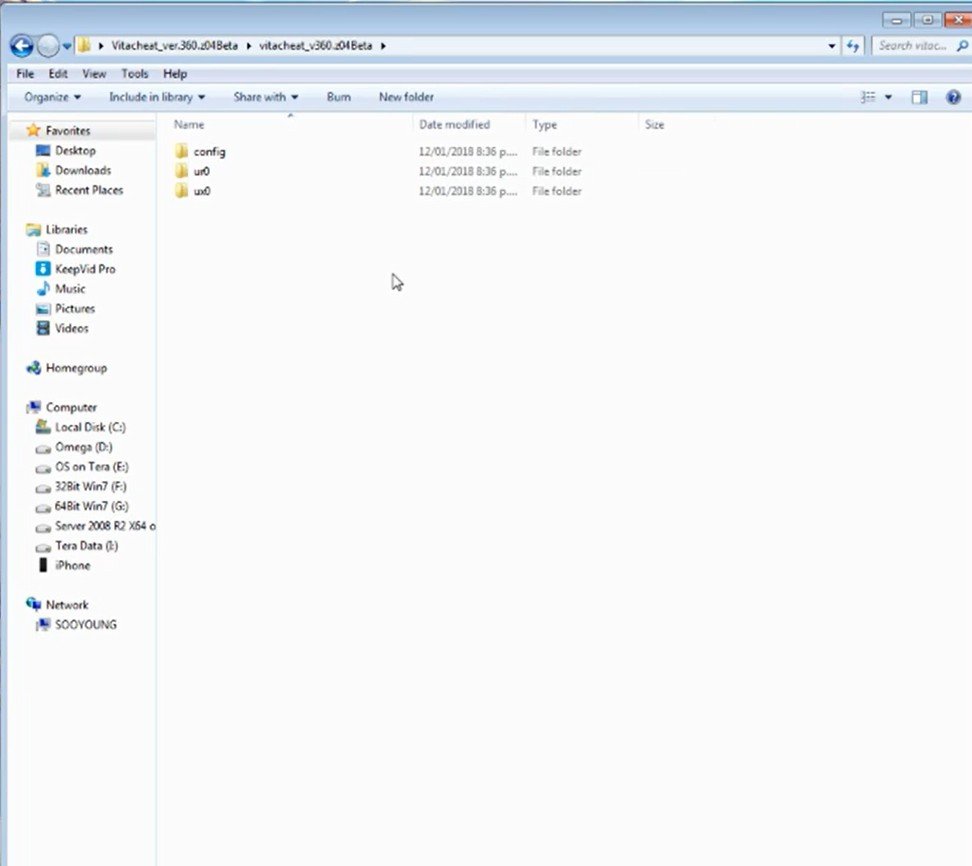
Extract the files: Inside the “for_beta” folder, you will find three directories.
Transfer to Vita:
Open VitaShell and start your FTP/USB connection.
Copy the
vitacheatfolder into yourux0:directory.Copy the
vitacheatfolder (containing the.skprxand.suprxfiles) into yourur0:directory.
Step 2: Edit Your Config File
To make the plugin run, you need to add it to your kernel list.
Navigate to
ur0:tai/and copy yourconfig.txtto your computer.Open it with Notepad++ and locate the *KERNEL section.
Add the following line under the kernel heading:
ur0:vitacheat/vitacheat.skprxSave the file and transfer it back to
ur0:tai/, overwriting the old one.Reboot your Vita to activate the plugin.
Step 3: Adding Cheat Databases (.psv files)
VitaCheat uses .psv files, which are essentially text files containing game title IDs and memory addresses.
On your Vita, navigate to
ux0:vitacheat/db/. This is where your cheat lists live.The filenames must match the Title ID of your game (e.g., PCSE00084 for Metal Gear Solid 3 US).
Find Cheats: You can find pre-made databases at repositories like VitaCheat Database.
Important Note: Cheats are region-specific. A cheat for a Japanese version of a game will usually not work for the US or European version due to differences in memory mapping.
Step 4: Activating Cheats In-Game
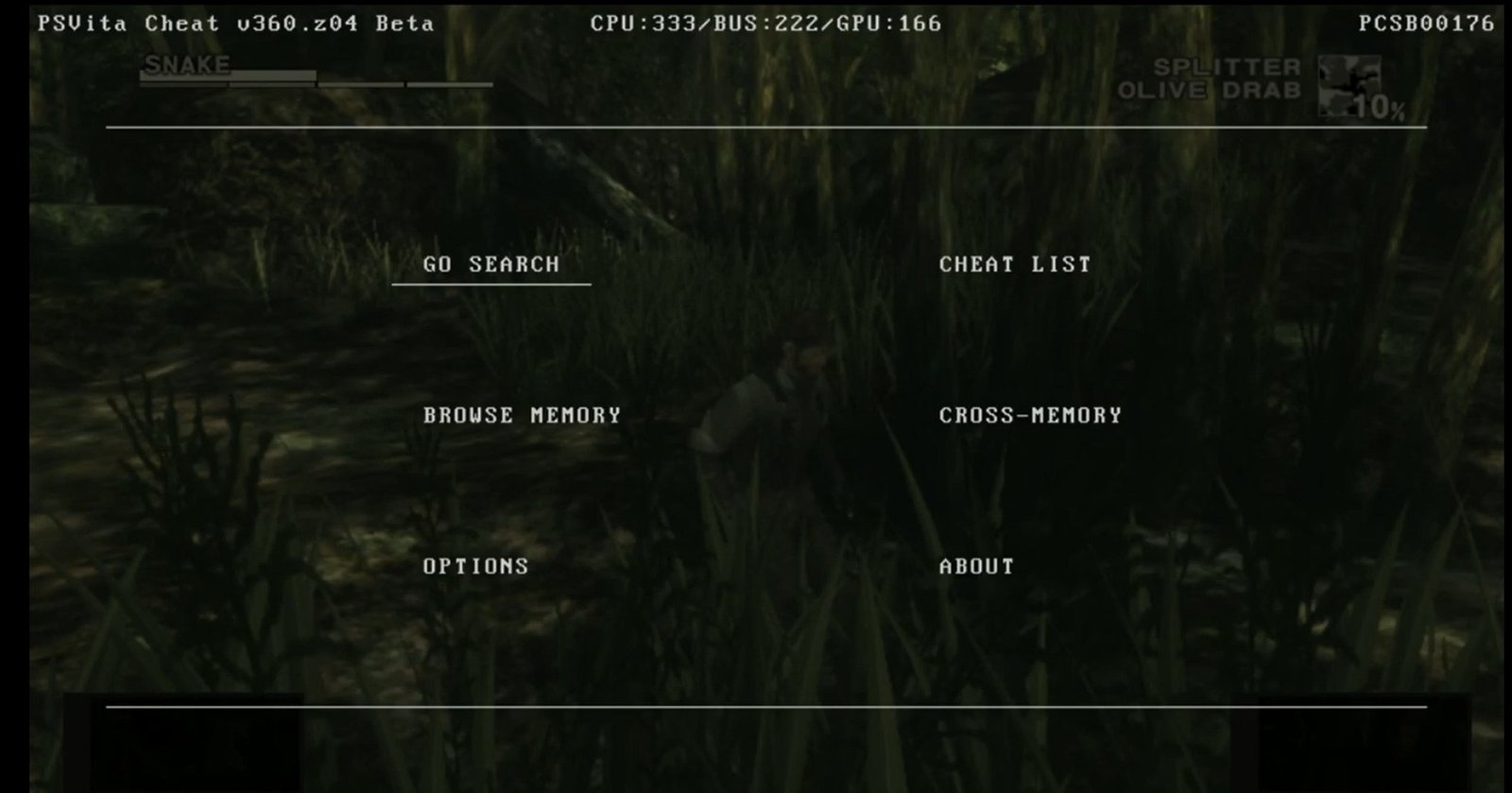
Once your game is loaded, follow these steps to use your cheats:
Open the Menu: Hold the L button and tap Right on the D-pad.
Select Cheats: Move to the right and push Circle. VitaCheat should detect the
.psvfile matching your game ID.Toggle Cheats: Use the D-pad to highlight a cheat and push Square to turn it on or off.
Exit: Push X twice to return to your game.
In Metal Gear Solid 3, for example, you can enable “100% Stealth,” “Infinite Ammo,” or “No Reload” to completely change the gameplay experience.
Advanced Features for Power Users
If you’re interested in creating your own cheats, VitaCheat includes several advanced tools:
Go Search: Helps you find memory ranges for specific variables (like health or money).
Browse Memory: Gives a real-time overview of how the game’s memory is laid out.
Cross Memory: Allows you to export game memory to a
.binfile for analysis on a PC.
How to Install VitaCheat Plugin Easily with AutoPlugin 2 on Your Vita or PSTV (No PC Required)
Prerequisites
Before we begin, ensure you have the following:
A Jailbroken PS Vita:
AutoPlugin 2: This is the “Swiss Army Knife” of Vita plugins. If you don’t have it, i have a complete guide on how you can download the AutoPlugin 2 VPK here.
Step 1: Installing the VitaCheat Plugin
Once you have AutoPlugin 2 installed on your Vita, follow these steps:
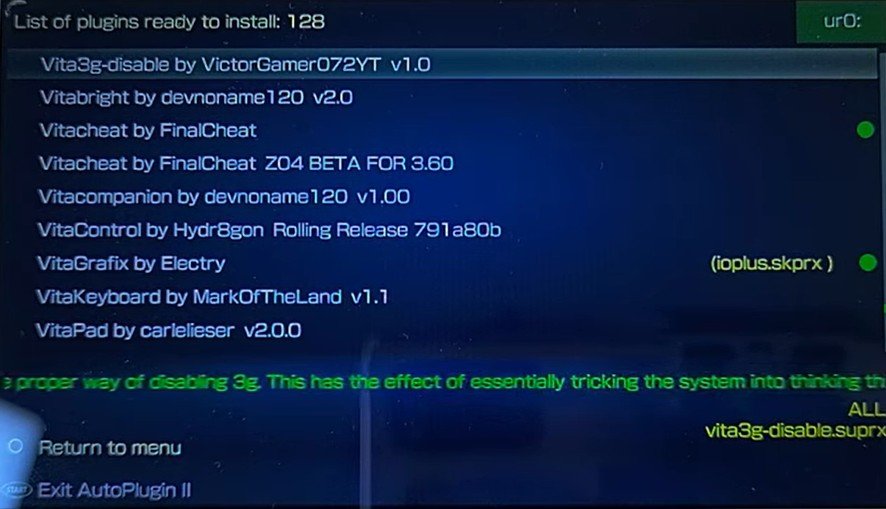
Launch AutoPlugin 2 from your LiveArea.
Navigate to Plugins for Vita and select Install Plugins.
Scroll down the list until you find VitaCheat.
Select your version: This is very important!
If you are on firmware 3.60, select the 3.60 version.
If you are on 3.65 or higher, select the 3.65 version.
Note: If you select the wrong version, the plugin will not work.
Press X to install. The app will download and configure the plugin for you.
Once complete, press Start to reboot your system.
Step 2: How to Activate Cheats In-Game
Now that the plugin is installed, you can activate cheats in almost any game.
Launch your game (e.g., Mortal Kombat).
Once the game is running, press L + Right on the D-Pad at the same time to bring up the VitaCheat menu.
Navigate to the Cheat List section to see available cheats for that specific game.
Follow the on-screen prompts to toggle your desired cheats (like unlocking bosses or infinite health).
Conclusion
VitaCheat is an incredible tool for exploring games in new ways, testing speedrun glitches, or just having some fun. If you want to dive deeper into the technical side, I recommend checking out the official VitaCheat User Guides for detailed instructions on memory searching and formatting.
Enjoy your modded Vita, and stay tuned for our next system guide based on the poll results!