
Table of Contents
Ladies and gentlemen, we are gathered here to witness another incredible moment in the history of this emulator. PPSSPP has updated to version 1.20.1, bringing a wave of new features, optimizations for low-end devices, and a major overhaul of the online experience.
After more than 15 years of active development across mobile, PC, and consoles, the PPSSPP team continues to prove they are the masters of optimization. Here is everything you need to know about this revolutionary update.
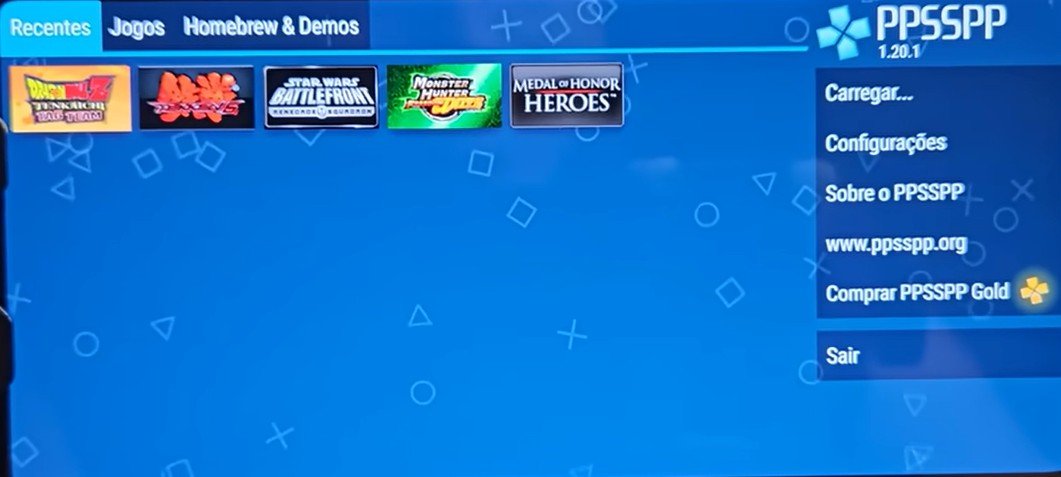
ppsspp v1.20.1 update
A Cleaner, Faster Interface
The first thing you’ll notice is the visual interface. The menus have been simplified, making it much easier to navigate through your library and settings.
-
Performance Boosts: Even “potato” phones will see improvements, as the update extracts maximum performance from modern hardware.
-
Better Organization: The settings are now divided into clear categories: Graphics, Controls, Audio, Networking, Tools, and System. There is even a new search bar to help you find specific settings quickly!
The Star of the Show: Simplified Online Play
Playing PSP games online used to be a technical nightmare. You often had to deal with complex configurations that worked for some but failed for others. That has completely changed.
The networking menu has been totally redesigned to make connections seamless. You can now play locally with friends on the same Wi-Fi or join community-maintained servers for massive multiplayer battles.
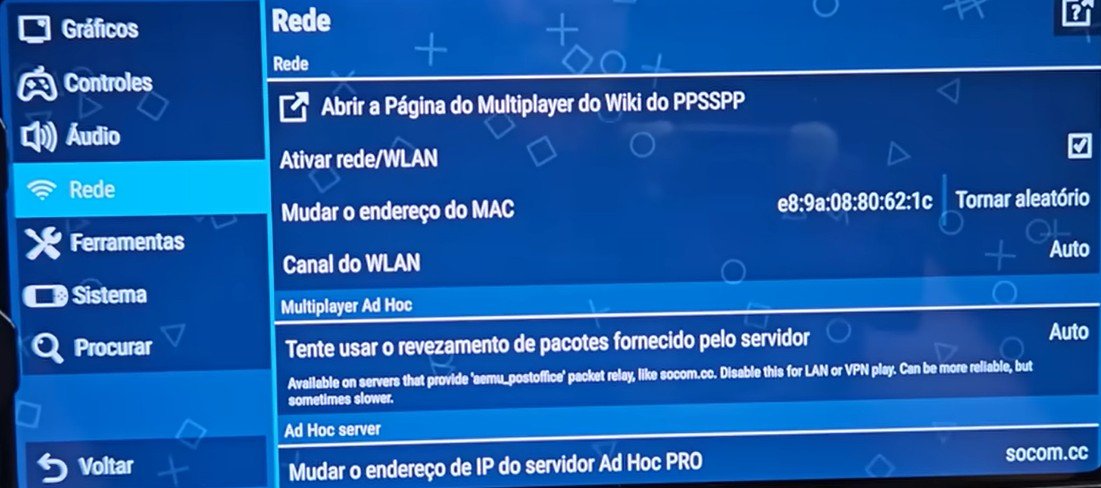
ppsspp v1.20.1 update online multiplayer
How to Configure Your Online Setup:
-
Enable Networking: Go to the Networking (Rede) tab and check Enable Networking/WLAN.
-
Built-in Server: Activate the Built-in Ad Hoc Server for a more stable connection.
-
Infrastructure Mode: Scroll down to the Infrastructure section. Here, you can set your Username and enable Auto-configure to handle the heavy lifting.
-
No Real Email Required: When a game asks you to create a network account, you can use a nickname and a dummy email; the community servers don’t require verified credentials.
Top Games to Play Online Right Now
Not every game supports online play, but the community is keeping the best ones alive! Here are the current highlights:
-
Medal of Honor Heroes: One of the best shooters for the system. You can jump straight into a lobby and join active rooms with players from around the world.
-
Tekken 6: Use the Network mode to join a “Battle Lobby.” Even if you are in Brazil and your opponent is on the other side of the world, you can challenge them to a fight.
-
Note: If your opponent has a slow device, your FPS may drop to match theirs for synchronization.
-
-
Dragon Ball Z: Tenkaichi Tag Team: You can see rooms from all over the world, though some private rooms may require an invite.
-
Star Wars Battlefront: Another classic with community-supported servers.
Local vs. Global Multiplayer
The new Ad Hoc system isn’t just for people sitting in the same room. It now acts like a massive local network connected via different global servers. When you enter a lobby, you’re often seeing players from every corner of the globe.
Conclusion
The 1.20.1 update is a massive victory for the emulation community. Whether you’re looking to relive the glory days of Monster Hunter or want to test your skills in Tekken, it has never been easier to get connected.
If you haven’t updated yet, head over to the Official PPSSPP Website or check your app store to grab the latest version.